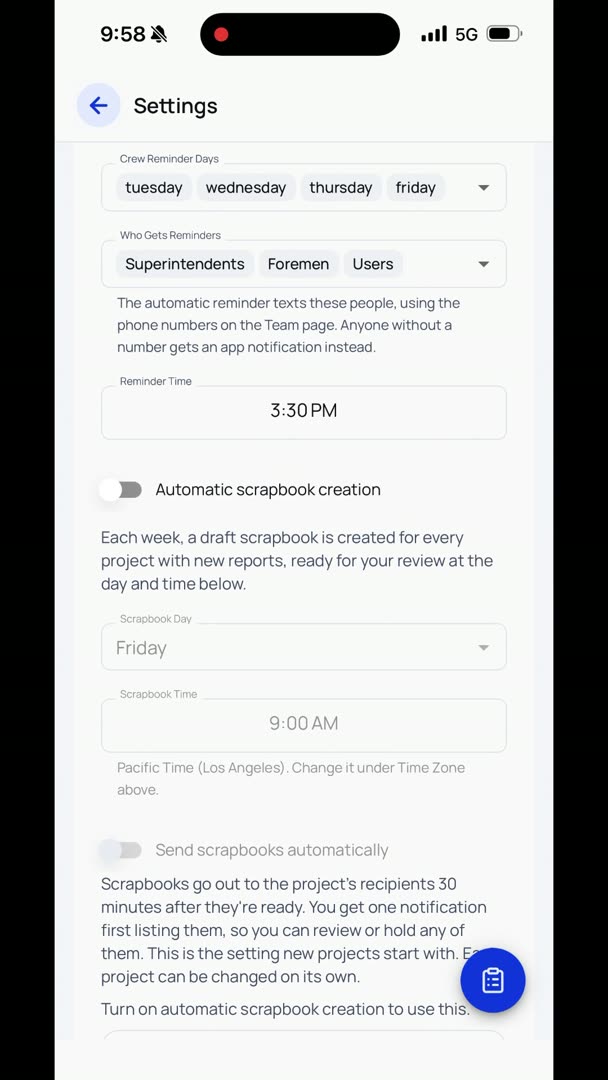
And if you want to set up crew reminder days, you can set it up for whatever day and time you want to do that. So then you also get to say who gets the reminders. So maybe I don't want project managers to have to get reminded to do their reports. So we're just going to send it to superintendents, foremen, and users. Or maybe we don't want users, necessarily, we just want superintendents and foremen, or however you want to set it up.
And so then it'll remind them every day at 8 a.m. Here are your crew reminder days. What day do I want it? Well, our team works four tens. We'll say Tuesday, Wednesday, Thursday, Friday, something like that.
And the reminder time, we're going to set that for 3:30 p.m.
So every day, on those days, at 3:30 p.m., they're going to get a quick reminder that just says, "Hey, don't forget to do your scrapbook," or, "Hey, don't forget to do your daily logs."